Redeem gifts at checkout
When a customer wins, they get an 8-character code. They show it to you at checkout: you validate it in seconds, then hand over the gift.
Validate a code
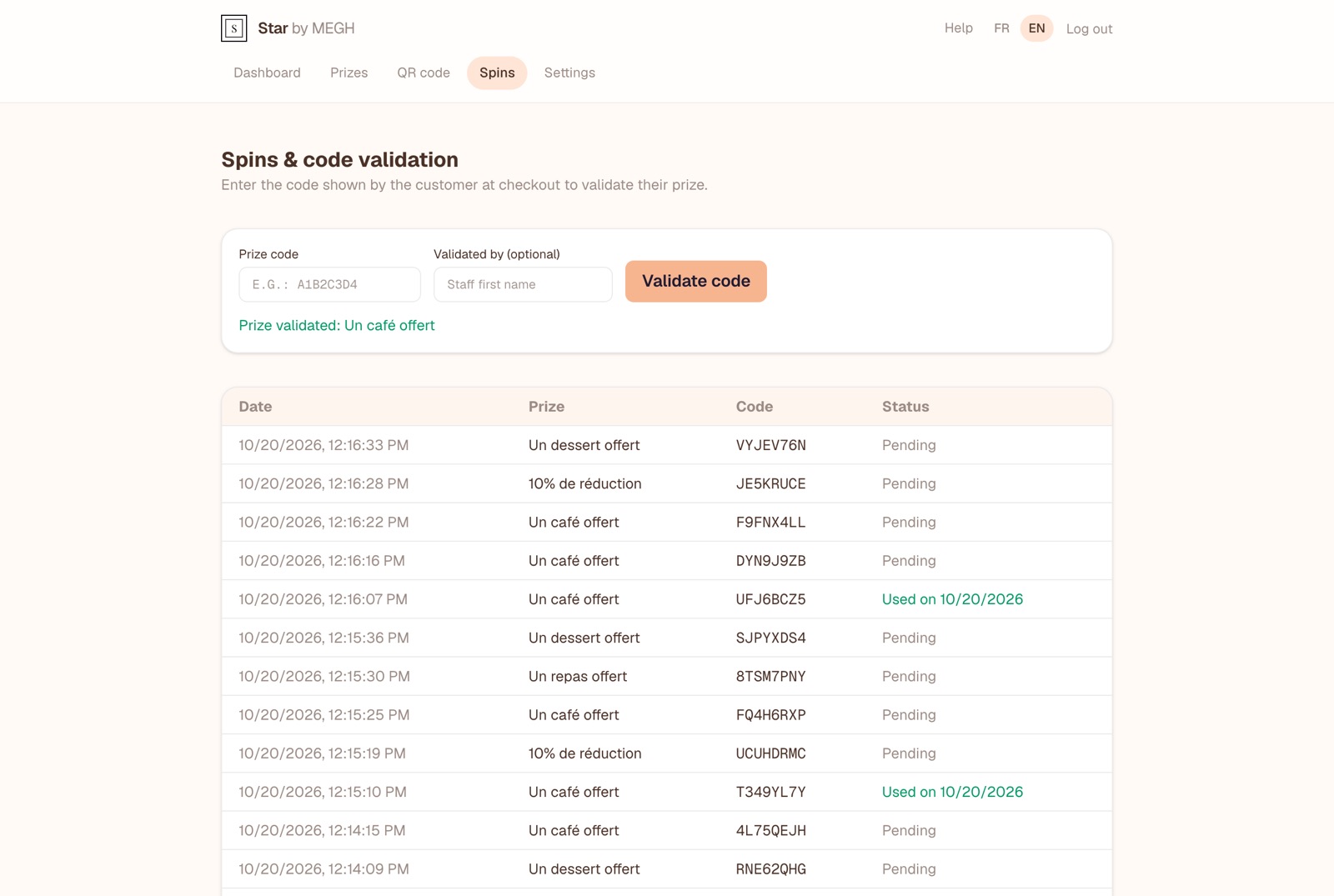
Open the “Spins” tab
On the checkout computer, a tablet or your phone.
Enter the code shown by the customer
For example R49XQF9S. Upper or lower case doesn't matter.
Enter who validates (optional)
The first name of the person at checkout, to know who handed over the gift.
Click “Validate code”
The message “Prize validated: …” confirms the gift to hand over. The code switches to “Used on …”.
Possible messages
- Prize validated: …: all good, hand over the gift shown.
- This code was already used on …: it was already validated, on the date shown. A code works only once: don't hand over the gift a second time.
- Code not found for this shop: check what was typed. A code won at another shop doesn't work at yours.
Spin history
Below the form, the table lists the last 100 spins: date, prize won, code and status (“Pending” or “Used on …”). You can, for example, find the code of a customer who lost it, if you know when they played.
Train your team in 2 minutes
Show them the Spins tab and do a test with a real code. Keep the tab open on the checkout computer: validation becomes second nature.